

Appearance
Payment Gateway Integration Guide
This guide provides a step-by-step approach to integrate your payment gateway with FluentCart. Follow these steps to create a fully functional payment gateway with support for one-time payments, subscriptions, and web hooks.
Implementation Steps
Step 1: Register Your Gateway
In your plugin's main file, register your gateway with FluentCart using the hook approach (recommended):
php
// In your-plugin.php
add_action('fluent_cart/register_payment_methods', function() {
    if (!function_exists('fluent_cart_api')) {
        return; // FluentCart not active
    }

    // Register your custom gateway
    fluent_cart_api()->registerCustomPaymentMethod(
        'your_gateway',
        new \YourPlugin\PaymentMethods\YourGateway\YourGateway()
    );
});
Don't eagerly require your gateway class file
fluent_cart/register_payment_methods fires on WordPress init (after FluentCart's own plugins_loaded → fluentcart_loaded → init chain), so calling registerCustomPaymentMethod inside it — as shown above — is already safe timing-wise. The pitfall is elsewhere: if your plugin's bootstrap requires the file that defines class YourGateway extends AbstractPaymentGateway too early (top-level in your main plugin file, or tied to fluentcart_loaded), PHP fatals on class-not-found at include time — AbstractPaymentGateway/BaseGatewaySettings may not exist yet at that point. Only require/autoload the gateway class file from inside the fluent_cart/register_payment_methods callback itself (or via lazy PSR-4 autoloading triggered by new YourGateway() there), same as the example above.
Alternatively, you can register on the init hook (not recommended):
php
add_action('init', function() {
    if (!function_exists('fluent_cart_api')) {
        return;
    }
    fluent_cart_api()->registerCustomPaymentMethod('your_gateway', new \YourPlugin\PaymentMethods\YourGateway\YourGateway());
});
Step 2: Create the Settings Class
Create a settings class that extends BaseGatewaySettings:
php
<?php
namespace YourPlugin\PaymentMethods\YourGateway;

use FluentCart\App\Modules\PaymentMethods\Core\BaseGatewaySettings;
use FluentCart\App\Helpers\Helper;

class YourGatewaySettings extends BaseGatewaySettings
{
    public $methodHandler = 'fluent_cart_payment_settings_your_gateway';

    public static function getDefaults()
    {
        return [
            'is_active' => 'no',
            'payment_mode' => 'test', // test or live
            'test_api_key' => '',
            'test_secret_key' => '',
            'live_api_key' => '',
            'live_secret_key' => '',
        ];
    }

    public function getApiKey()
    {
        $mode = $this->get('payment_mode');
        return $this->get($mode . '_api_key');
    }

    public function getSecretKey()
    {
        $mode = $this->get('payment_mode');
        return Helper::decryptKey($this->get($mode . '_secret_key'));
    }

    public function isTestMode()
    {
        return $this->get('payment_mode') === 'test';
    }
}
Step 3: Create your Gateway Class
Create base class that implements all required methods:
php
<?php
namespace YourPlugin\PaymentMethods\YourGateway;

use FluentCart\App\Modules\PaymentMethods\Core\AbstractPaymentGateway;
use FluentCart\App\Services\Payments\PaymentInstance;
use FluentCart\Framework\Support\Arr;

class YourGateway extends AbstractPaymentGateway
{
    // Define supported features
    // 'payment' and 'refund' are queried through has(). 'webhook' is
    // declarative, and every built-in gateway lists it.
    //
    // Leave 'subscriptions' out: AbstractPaymentGateway::__construct() appends
    // it when you pass a subscription module.
    public array $supportedFeatures = [
        'payment',
        'refund',
        'webhook'
    ];


    public function __construct()
    {
        // AbstractPaymentGateway::__construct() is type-enforced: it requires a
        // BaseGatewaySettings instance as its first argument. Passing anything else
        // (or omitting it) is a fatal TypeError, not a soft failure.
        parent::__construct(new YourGatewaySettings());

    }

    public function boot()
    {
        // initialize any hanldere, webhook/ payment confirmation class if needed
    }

    // Required: Return gateway metadata
    public function meta(): array
    {
        return [
            'title' => __('Your Gateway', 'your-plugin'),
            'route' => 'your_gateway',
            'slug' => 'your_gateway',
            'description' => __('Accept payments with Your Gateway', 'your-plugin'),
            'logo' => plugin_dir_url(__FILE__) .
                'assets/images/logo.svg',
            'icon' => plugin_dir_url(__FILE__) .
                'assets/images/icon.svg',
            'status' => $this->settings->get('is_active') === 'yes',
            'supported_features' => $this->supportedFeatures
        ];
    }

    // Not required: AbstractPaymentGateway already implements has() against
    // $supportedFeatures. Override it only if you need custom feature logic.

    // Required: Process payment
    public function makePaymentFromPaymentInstance(PaymentInstance $paymentInstance)
    {
        // Your payment processing logic here

    }

    // Required: Handle IPNs/Webhooks
    public function handleIPN()
    {
        // Process the webhook

    }


    #required: Return settings fields configuration
    public function fields(): array
    {
        // For a comprehensive guide on building gateway settings fields,
        // see the detailed [Payment Gateway Settings Fields] documentation link given below
        return [
            ....
        ];
    }

    // For a comprehensive guide on building gateway settings fields,
    // see the detailed documentation: [Payment Gateway Settings Fields](./payment_setting_fields.md)

    // Required: declared on PaymentGatewayInterface, not just a convention —
    // omitting it is a fatal "abstract method not implemented" error, even though
    // AbstractPaymentGateway doesn't spell it out with a PHP `abstract` keyword.
    #required: Get order information for frontend
    public function getOrderInfo(array $data)
    {
        // Prepare frontend data for checkout
        $paymentArgs = [];

        // Return data for frontend
        wp_send_json([
            'status' => 'success',
            'payment_args' => $paymentArgs,
            'message' => __('Order info retrieved', 'your-plugin')
        ], 200);
    }

    #required: Register scripts (automatically called by base gateway)
    public function getEnqueueScriptSrc($hasSubscription = 'no'): array
    {
        // External gateway library, custom checkout scripts (if needed), otherwise return empty array
        $gatewayLibUrl = 'https://js.yourgateway.com/v1/checkout.js';

        return [
            [
                'handle' => 'your-gateway-external-lib',
                'src' => $gatewayLibUrl,
            ],
            [
                'handle' => 'fluent-cart-your-gateway-checkout',
                'src' => plugin_dir_url(__FILE__) . 'assets/js/your-gateway-checkout.js',
                'deps' => ['your-gateway-external-lib'],
                'version' => FLUENTCART_VERSION
            ]
        ];
    }
}
fields() method setup
For a comprehensive guide on building gateway settings fields, see the detailed documentation: Payment Gateway Settings Fields
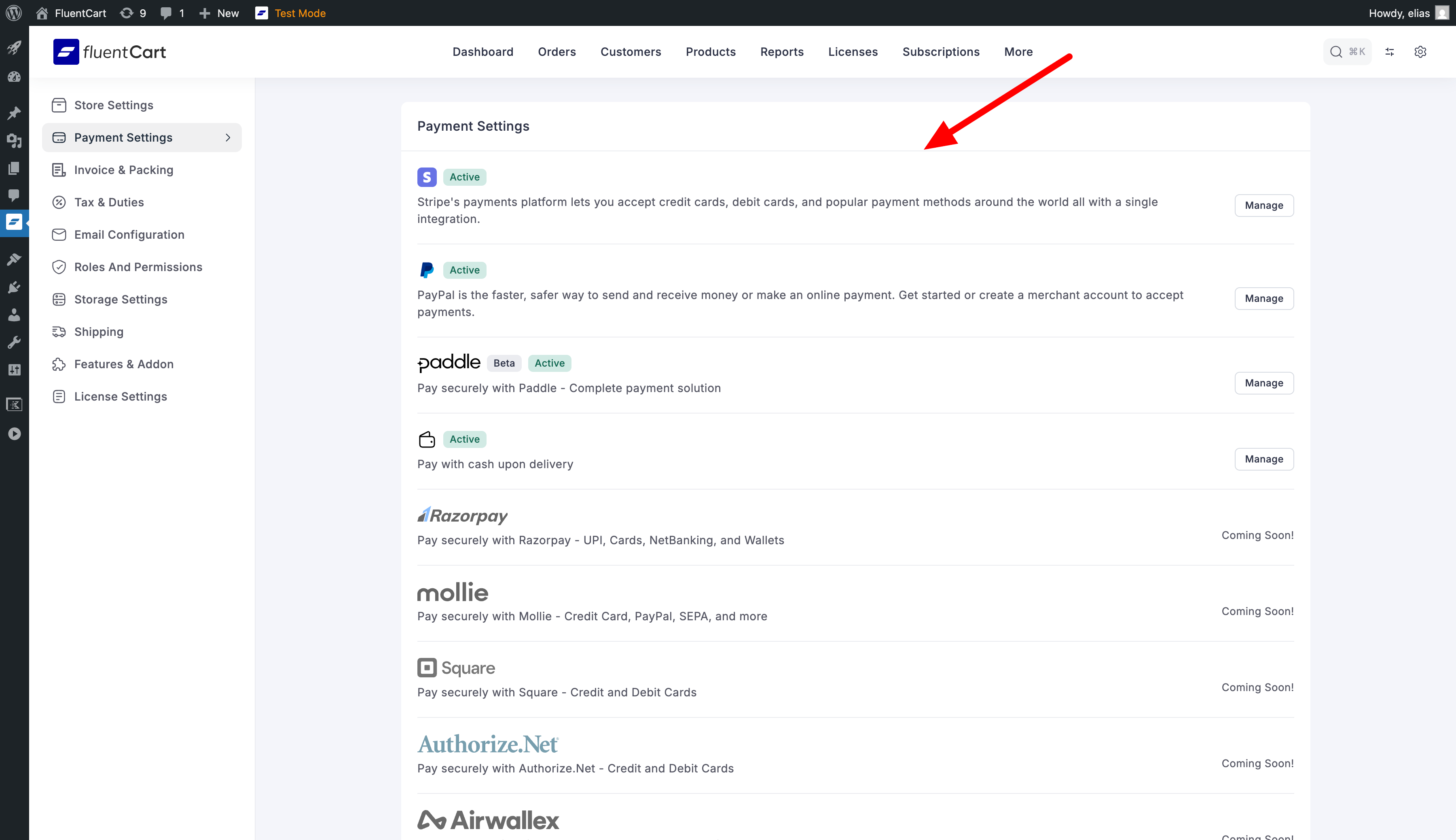
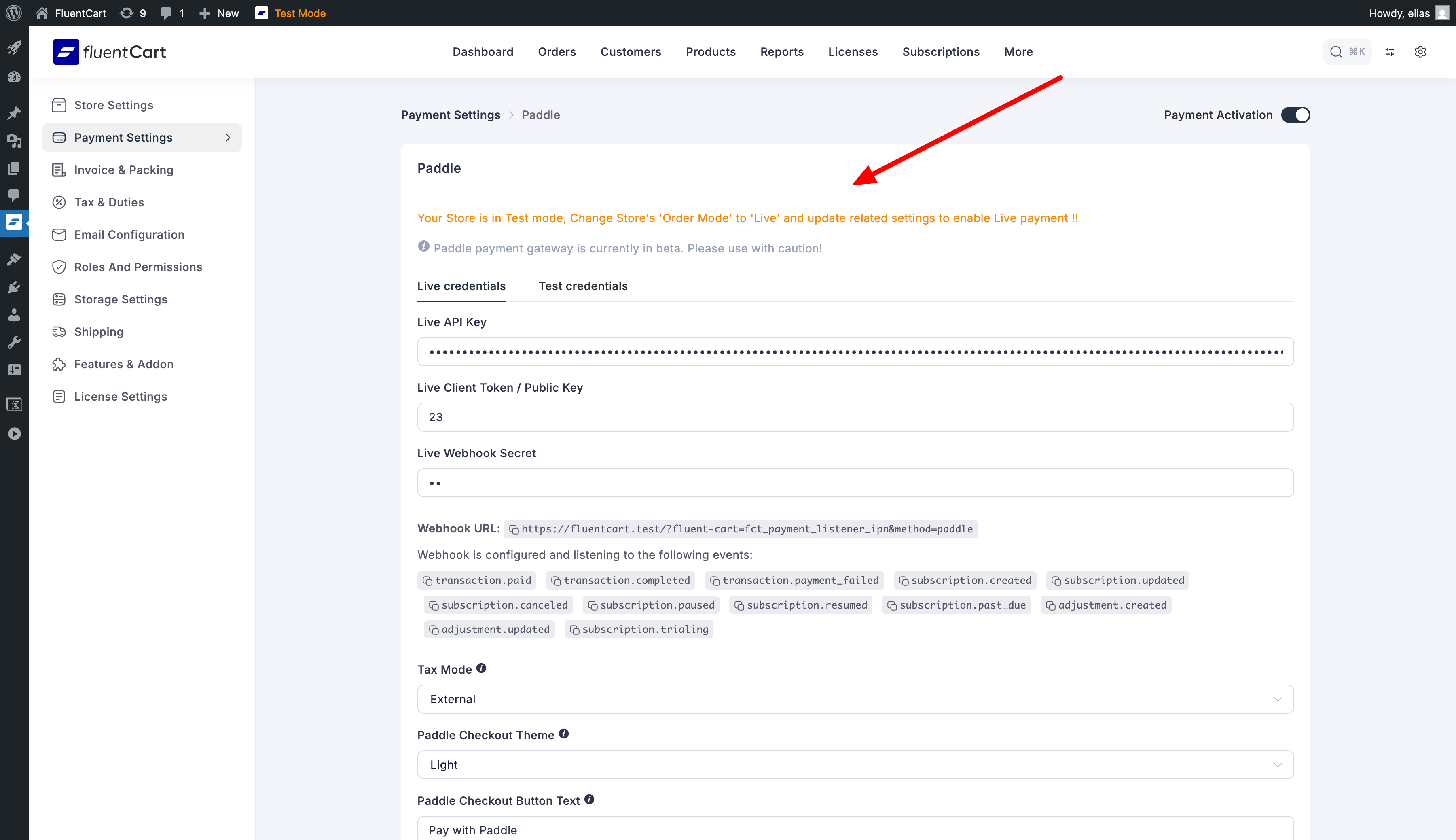
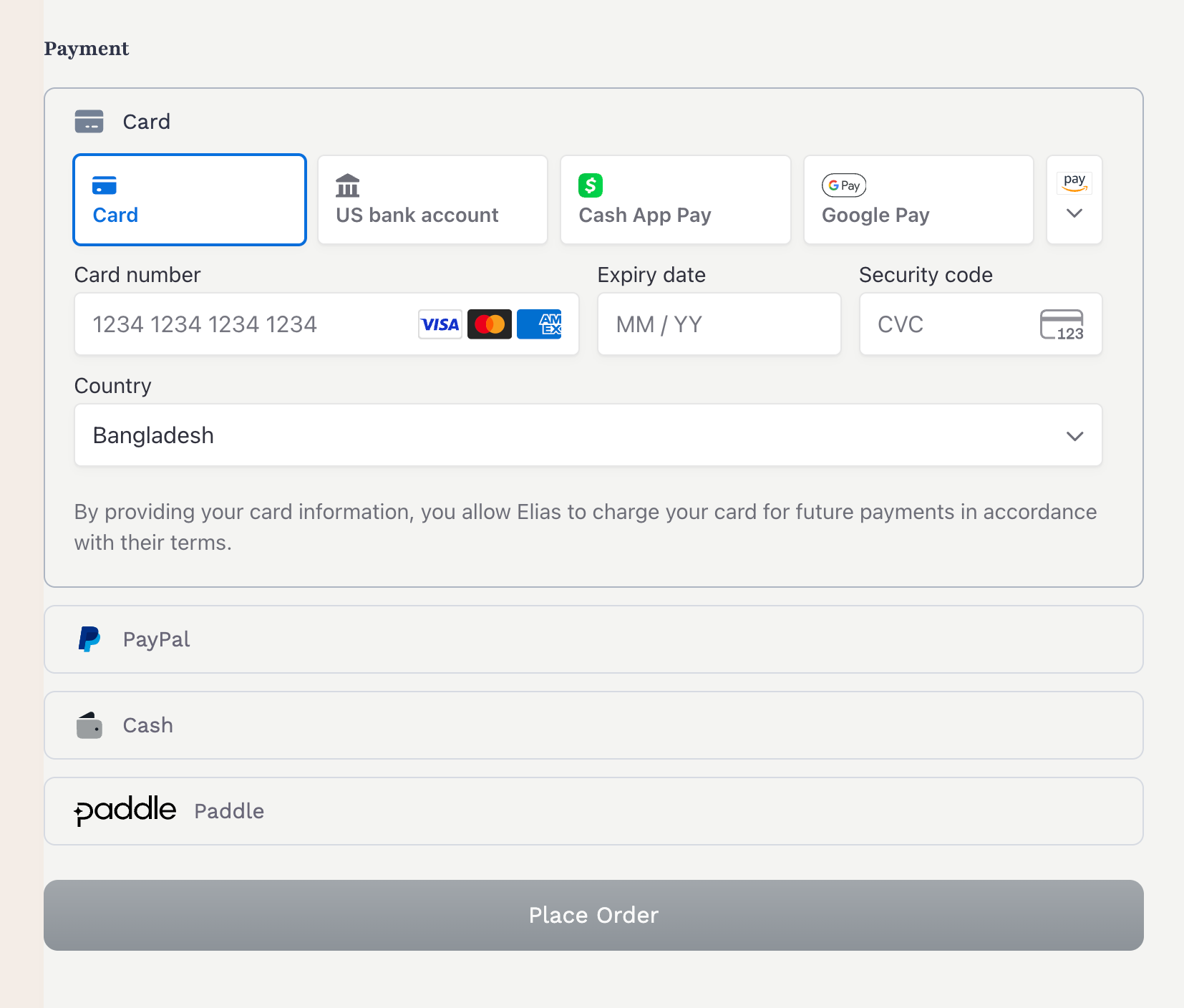
Now your gateway registration is done, you will see your gateway in the payment methods list in FluentCart admin dashboard. And if you follow the Fields guide and Configure your gateway settings and save with Payment activation on, you will see the gateway in the payment methods list in FluentCart checkout page.
Step 4: Create JavaScript File for Frontend Checkout
FluentCart uses a custom event system to load payment methods in the checkout page. When a customer selects your payment method, FluentCart triggers a custom event in the format: fluent_cart_load_payments_[payment_method_slug].
Required — the Place Order button stays disabled without this
Every gateway must register a listener for its fluent_cart_load_payments_[payment_method_slug] event and call e.detail.paymentLoader.enableCheckoutButton() once the gateway is ready to accept the order. FluentCart keeps the Place Order button greyed out while the selected payment method is loading, and it is your listener's enableCheckoutButton() call that re-enables it. If the listener is missing (or never calls enableCheckoutButton()), the Place Order button stays greyed out and the customer cannot check out — even a gateway with no frontend UI (offline/COD-style) needs this listener.
Your JavaScript file must listen for this event and handle the payment process accordingly. Here's a simple example:
javascript
window.addEventListener("fluent_cart_load_payments_your_gateway", function (e) {
    const submitButton = window.fluentcart_checkout_vars?.submit_button;
    const gatewayContainer = document.querySelector('.fluent-cart-checkout_embed_payment_container_your_gateway');
    const translations = window.fct_your_gateway_data?.translations || {};

    function $t(string) {
        return translations[string] || string;
    }

    // Simple implementation (like COD/offline payments)
    if (gatewayContainer) {
        gatewayContainer.innerHTML = `<p>${$t('Your payment instructions here.')}</p>`;
    }

    // Enable the checkout button
    e.detail.paymentLoader.enableCheckoutButton(submitButton.text);

    // OR if you need to integrate with a third-party SDK:
    // loadYourGatewaySDK(e.detail.paymentInfoUrl, e.detail.nonce, e.detail.form, e.detail.paymentLoader);
});

// Example function for loading a more complex gateway SDK
function loadYourGatewaySDK(paymentInfoUrl, nonce, form, paymentLoader) {
    // Fetch payment information from server
    fetch(paymentInfoUrl, {
        method: "POST",
        headers: {
            "Content-Type": "application/json",
            "X-WP-Nonce": nonce,
        },
        credentials: 'include'
    }).then(response => response.json())
    .then(data => {
        // Initialize your gateway SDK with the data
        // When ready, enable the checkout button:
        paymentLoader.enableCheckoutButton('Pay Now');
    });
}
Payment methods list in FluentCart admin dashboard
Payment method settings configuration page
Active payment methods displayed in checkout page
Start taking payments with your gateway
Step 4: Create an API Handler
Create a class for API communications with your payment provider:
php
<?php
namespace YourPlugin\PaymentMethods\YourGateway;

class API
{
    private $settings;
    private $baseUrl;

    public function __construct(YourGatewaySettings $settings)
    {
        $this->settings = $settings;
        $this->baseUrl = $settings->isTestMode()
            ? 'https://api-test.yourgateway.com/v1'
            : 'https://api.yourgateway.com/v1';
    }

    public function makeRequest($method, $endpoint, $data = [])
    {
        $args = [
            'method' => $method,
            'headers' => [
                'Authorization' => 'Bearer ' . $this->settings->getApiKey(),
                'Content-Type' => 'application/json',
            ],
            'timeout' => 30
        ];

        if (!empty($data) && in_array($method, ['POST', 'PUT'])) {
            $args['body'] = json_encode($data);
        }

        $response = wp_remote_request($this->baseUrl . $endpoint, $args);

        if (is_wp_error($response)) {
            return [
                'success' => false,
                'message' => $response->get_error_message()
            ];
        }

        $body = wp_remote_retrieve_body($response);
        $data = json_decode($body, true);
        $code = wp_remote_retrieve_response_code($response);

        if ($code >= 400) {
            return [
                'success' => false,
                'message' => $data['error'] ?? 'API request failed'
            ];
        }

        return [
            'success' => true,
            'data' => $data
        ];
    }

    public function createPayment($paymentData)
    {
        return $this->makeRequest('POST', '/payments', $paymentData);
    }

    public function createSubscription($subscriptionData)
    {
        return $this->makeRequest('POST', '/subscriptions', $subscriptionData);
    }

    public function refundPayment($paymentId, $amount, $reason = '')
    {
        return $this->makeRequest('POST', "/payments/{$paymentId}/refund", [
            'amount' => $amount,
            'reason' => $reason
        ]);
    }
}
Step 5: Payment processing
php
<?php

 #YourGateway.php

public function makePaymentFromPaymentInstance(PaymentInstance $paymentInstance)
{
    $order = $paymentInstance->order;

    // check if this is a subscription payment
    if ($paymentInstance->subscription) {
        return $this->handleSubscriptionPayment($paymentInstance);
    }

    // This is a regular one-time payment
    return $this->handleOneTimePayment($paymentInstance);
}

// Example of one-time payment processing

// option 1: make payment with hosted(redirect) checkout
private function handleOneTimePayment(PaymentInstance $paymentInstance)
{
    $order = $paymentInstance->order;
    $transaction = $paymentInstance->transaction;

    $api = new API($this->settings);

    // Prepare payment data for the API
    $paymentData = [
       ....
    ];

    // Create payment in your gateway
    $result = $api->createPayment($paymentData);

    if ($result['success']) {
        // Store payment ID for later reference
        $transaction->update([
            ...
        ]);

        // Return the redirect response (for redirect-based gateways)
        return [
            'status'       => 'success',
            'nextAction'   => 'your_gateway',
            'actionName'   => 'redirect',
            'message'      => __('Redirecting to payment...', 'fluent-cart'),
            'response'     => $result,
            'payment_args' => [
                'checkout_url' => $result['data']['checkout_url'],
            ],
        ];
    }
}


// option 2: make payment onsite
private function handleOneTimePayment(PaymentInstance $paymentInstance)
{
    $order = $paymentInstance->order;
    $transaction = $paymentInstance->transaction;

    $api = new API($this->settings);

    // Prepare payment data for the API
    $paymentData = [
       ....
    ];

    // Create payment in your gateway
    $result = $api->createPayment($paymentData);

    if ($result['success']) {
        // Store payment ID for later reference
        $transaction->update([
            ...
        ]);

        // Return success response with custom action to redirect to your own your-gateway-checkout.js
        return [
            'nextAction'         => 'your_gateway',
            'actionName'         => 'custom',
            'status'             => 'success',
            'message' => __('Order has been placed successfully', 'fluent-cart'),
            'response' => $result,
        ];
    }
}

// ... subscription is similar to one-time payment
Return format of makePaymentFromPaymentInstance()
The array returned from makePaymentFromPaymentInstance() tells the checkout frontend what to do next. The supported keys:
| Key | Required | Description |
|---|---|---|
status | Yes | 'success' when the payment was initiated successfully. |
actionName | Yes* | What the frontend should do: 'redirect' (send the browser to payment_args.checkout_url) or 'custom' (dispatch a fluent_cart_payment_next_action_{nextAction} event for your own JS to handle). |
nextAction | Yes* | Your payment method slug. For actionName: 'custom' it names the event your JS listens to (fluent_cart_payment_next_action_your_gateway). |
message | No | Status message shown while processing. |
response | No | The raw gateway API response. For actionName: 'custom' your JS receives it in the event's detail.response. |
payment_args | For redirect | Array of arguments for the next action. For actionName: 'redirect', payment_args.checkout_url is the URL the browser is sent to (works inside the modal/iframe checkout too — the top window is redirected). |
* Alternatively, returning a top-level redirect_to key redirects the browser to that URL directly without actionName/payment_args. The actionName: 'redirect' format above is the canonical one used by FluentCart's own gateways.
For a redirect-based (hosted checkout) gateway, the full return looks like:
php
return [
    'status'       => 'success',
    'nextAction'   => 'your_gateway',
    'actionName'   => 'redirect',
    'message'      => __('Redirecting...', 'fluent-cart'),
    'response'     => $apiResponse,
    'payment_args' => [
        'checkout_url' => $redirectUrl,
    ],
];
Step 6: Confirm Payment
Payment confirmation can be done in two ways:
Ajax call from your your-gateway-checkout.js (onsite payment)
php
<?php

#YourGateway.php

// init ajax handler in boot/constructor
public function boot()
{
    ....
    add_action('wp_ajax_fluent_cart_confirm_your_gateway_payment', [$this, 'confirmPayment']);
    add_action('wp_ajax_nopriv_fluent_cart_confirm_your_gateway_payment', [$this, 'confirmPayment']);
}

// Example
public function confirmPayment()
{

    // Get data from request
    $transactionId = sanitize_text_field($_REQUEST['transaction_id'] ?? '');
    $paymentId = sanitize_text_field($_REQUEST['payment_id'] ??

    // Find the transaction by UUID (ref_id)
    $transaction = OrderTransaction::query()->where('uuid', $transactionId)->first();

    if (!$transaction) {
        wp_send_json([
            'message' => 'Transaction ID is required to confirm the payment.',
            'status' => 'failed'
        ], 400);
    }

    // Check if already processed
    if ($transaction->status === Status::TRANSACTION_SUCCEEDED) {
        wp_send_json([
            'redirect_url' => $transaction->getReceiptPageUrl(),
            'order' => [
                'uuid' => $transaction->order->uuid,
            ],
            'message' => __('Payment already confirmed.', 'fluent-cart'),
            'status' => 'success'
        ], 200);
    }

    // Verify payment with gateway API
    // $paymentStatus = YourGatewayAPI::verifyPayment($paymentId);

    // Update transaction and order status
    $transaction->fill([
        'status' => Status::TRANSACTION_SUCCEEDED,
        'vendor_charge_id' => $paymentId,
        // Add other fields as needed
    ]);
    $transaction->save();


    // Update order status
    $order = Order::query()->find($transaction->order_id);
    (new StatusHelper($order))->syncOrderStatuses($transaction);

    // Send success response
    wp_send_json([
        'redirect_url' => $transaction->getReceiptPageUrl(),
        'order' => [
            'uuid' => $transaction->order->uuid,
        ],
        'message' => __('Payment confirmed successfully.', 'fluent-cart'),
        'status' => 'success'
    ],

}
With IPN/Webhooks (Hosted payment)
php
<?php

// YourGateway.php

// init ipn handler in boot/constructor
public function boot()
{
    ....
    add_action('fluent_cart/payments/your_gateway/webhook_payment_completed', [$this, 'handlePaymentCompleted']);
    ....
}

public function handleIPN(): void
{
    // Process the webhook
    $this->processWebhookEvent($data);
}

// Example of webhook processing
public function processWebhookEvent($data)
{
    $eventType = $data['event'] ?? '';
    $eventTypeFormatted = str_replace('.', '_', $eventType);

    // Fire specific event handler
    if (has_action('fluent_cart/payments/your_gateway/webhook_' . $eventTypeFormatted)) {
        do_action('fluent_cart/payments/your_gateway/webhook_' . $eventTypeFormatted, [
            'data' => $data,
            'raw' => $rawPayload,
            'order' => $order
        ]);
    }
}


// Example of payment confirmation
public function handlePaymentCompleted($data)
{
    $paymentId = $data['payment']['id'] ?? '';

    // Find the transaction
    $transaction = OrderTransaction::query()->where('uuid', $transactionId)->first();

    if (!$transaction) {
        return;
    }

    // Check if already processed
    if ($transaction->status === Status::TRANSACTION_SUCCEEDED) {
        return;
    }

    // Get transaction details from YourGateway
    $yourGatewayTransaction = API::getYourGatewayObject("transactions/{$paymentId}", [], $transaction->payment_mode);

    if (is_wp_error($yourGatewayTransaction)) {
        return;
    }

    $data = Arr::get($yourGatewayTransaction, 'data');
    $transactionStatus = Arr::get($data, 'status');

    // Check if payment is completed
    if ($transactionStatus !== 'paid' && $transactionStatus !== 'completed') {
        return;
    }

    // Update transaction and order status
    $transaction->fill([
        'status' => Status::TRANSACTION_SUCCEEDED,
        'vendor_charge_id' => $paymentId,
        // Add other fields as needed
    ]);
    $transaction->save();

    // Update order status
    $order = Order::query()->find($transaction->order_id);
    (new StatusHelper($order))->syncOrderStatuses($transaction);
}
Step 7: (optional) Create your-gateway-checkout.js
Create custom JavaScript file to handle (onsite) payment checkout, step #3 above is enough for (hosted) payment checkout.
Example of onsite payment checkout with custom checkout button
javascript
// File: assets/js/your-gateway-checkout.js
class YourGatewayCheckout {
    constructor(form, orderHandler, response, paymentLoader) {
        this.form = form;
        this.orderHandler = orderHandler;
        this.response = response;
        this.paymentLoader = paymentLoader;
        this.paymentArgs = response?.payment_args || {};
    }

    init() {
        // Find the payment container
        const paymentContainer = document.querySelector('.fluent-cart-checkout_embed_payment_container_your_gateway');
        if (!paymentContainer) {
            console.error('Payment container not found');
            return;
        }

        // Create payment button
        this.createPaymentButton(paymentContainer);

        // Initialize gateway SDK (if applicable)
        this.initGatewaySDK();
    }

    createPaymentButton(container) {
        // Clear container
        container.innerHTML = '';

        // Create button
        const button = document.createElement('button');
        button.type = 'button';
        button.className = 'your-gateway-checkout-button';
        button.textContent = 'Pay with Your Gateway';
        button.style.cssText = `
            width: 100%;
            padding: 12px;
            background: #007bff;
            color: #fff;
            border: none;
            border-radius: 4px;
            font-size: 16px;
            cursor: pointer;
        `;

        // Add click event
        button.addEventListener('click', () => {
            this.handlePaymentButtonClick();
        });

        // Add to container
        container.appendChild(button);
    }

    initGatewaySDK() {
        // Initialize your gateway's SDK if required
        if (window.YourGatewaySDK) {
            window.YourGatewaySDK.initialize({
                publicKey: this.paymentArgs.public_key,
                environment: this.paymentArgs.mode
            });
        }
    }

    async handlePaymentButtonClick() {
        try {
            this.paymentLoader?.changeLoaderStatus('processing');

            // Create order in FluentCart first
            const orderResponse = await this.orderHandler.createOrder();

            if (!orderResponse?.success) {
                throw new Error('Failed to create order');
            }

            // For redirect-based gateways
            if (orderResponse.redirect_url) {
                window.location.href = orderResponse.redirect_url;
                return;
            }

            // For JS-based gateways, open checkout modal
            if (window.YourGatewaySDK) {
                const result = await window.YourGatewaySDK.openCheckout({
                    amount: this.response.amount,
                    currency: this.response.currency,
                    orderId: orderResponse.order_id,
                    onSuccess: (data) => {
                        // Confirm payment on your server
                        this.confirmPayment(data, orderResponse);
                    },
                    onCancel: () => {
                        this.paymentLoader?.hideLoader();
                    }
                });
            }
        } catch (error) {
            this.paymentLoader?.changeLoaderStatus('Error: ' + error.message);
            this.paymentLoader?.hideLoader();
        }
    }

    async confirmPayment(gatewayData, orderData) {
        try {
            // Confirm payment on your server
            const confirmResponse = await fetch(fluentCartData.ajax_url, {
                method: 'POST',
                headers: {"Content-Type": "application/json"},
                credentials: 'same-origin',
                body: JSON.stringify({
                    action: 'fluent_cart_confirm_your_gateway_payment',
                    transaction_id: orderData.transaction_id,
                    payment_id: gatewayData.paymentId
                })
            });

            const confirmation = await confirmResponse.json();

            if (confirmation.success && confirmation.redirect_url) {
                window.location.href = confirmation.redirect_url;
            } else {
                throw new Error(confirmation.message || 'Payment confirmation failed');
            }
        } catch (error) {
            this.paymentLoader?.changeLoaderStatus('Error: ' + error.message);
            this.paymentLoader?.hideLoader();
        }
    }
}

// Initialize when FluentCart triggers the event
window.addEventListener("fluent_cart_load_payments_your_gateway", function (e) {
    fetch(e.detail.paymentInfoUrl, {
        method: "POST",
        headers: {
            "Content-Type": "application/json"
        },
        credentials: 'include'
    })
    .then(response => response.json())
    .then(data => {
        new YourGatewayCheckout(
            e.detail.form,
            e.detail.orderHandler,
            data,
            e.detail.paymentLoader
        ).init();
    })
    .catch(error => {
        console.error('Error initializing gateway:', error);
    });
});
Key FluentCart Services to Use
FluentCart provides these services to make gateway development easier:
StatusHelper for Order Updates
php
// Update order status and fire all necessary hooks
(new \FluentCart\App\Helpers\StatusHelper($order))->syncOrderStatuses($transaction);

// Hooks this call fires:
// - fluent_cart/order_paid, then fluent_cart/order_paid_done
// - fluent_cart/renewal_paid (renewal orders)
// - fluent_cart/cart_completed
// - fluent_cart/subscription_activated (when a subscription starts)
$data = [
    'order'       => $this->order,
    'customer'    => $this->customer ?? null,
    'transaction' => $this->transaction ?? null
];
Refund Service for Handling Refunds
php
// Use Refund service for all refund operations
\FluentCart\App\Services\Payments\Refund::createOrRecordRefund([
    'vendor_charge_id' => $refundId,
    'payment_method' => 'your_gateway',
    'status' => 'refunded',
    'total' => $refundAmount,
], $parentTransaction);

// This automatically handles:
// - Creating refund transaction
// - Updating order status
// - Firing all refund-related hooks
Subscription Handling
For subscription renewals, use SubscriptionService. There is no SubscriptionRenewal class. Note the argument order: the transaction data comes first, the subscription second.
php
\FluentCart\App\Modules\Subscriptions\Services\SubscriptionService::recordRenewalPayment(
    [
        'amount'         => $amount,          // cents
        'transaction_id' => $paymentId,
        'payment_method' => 'your_gateway',
        'status'         => 'completed'
    ],
    $subscription,          // optional
    []                      // optional subscription update args
);
Important Hooks
Key hooks to be aware of:
Payment Hooks (Handled by StatusHelper):
fluent_cart/order_paidfluent_cart/order_paid_donefluent_cart/renewal_paidfluent_cart/cart_completed
php$data = array( 'order' => $this->order, 'customer' => $this->customer ?? null, 'transaction' => $this->transaction ?? null );Subscription Hooks (dispatched as events):
fluent_cart/subscription_activatedfluent_cart/subscription_renewedfluent_cart/subscription_canceled— onel, matchingStatus::SUBSCRIPTION_CANCELEDfluent_cart/subscription_renewal_failedfluent_cart/subscription_paused,_resumed,_reactivated
php$data = array( 'subscription' => $this->subscription, 'order' => $this->order, 'customer' => $this->customer ?? [], );
Learn more about hooks in FluentCart Hooks documentation.
Testing Your Gateway
- Install & Activate: Activate your plugin in WordPress
- Configure: Go to FluentCart → Settings → Payment Methods
- Test Payment: Test a one-time payment on the checkout page
- Test Subscription: Test a subscription product if supported
- Test Web Hook: Test web hook processing using a tool like RequestBin
Common Pitfalls
A few things that aren't obvious from the interface/base class alone and can cost time to reverse-engineer:
- Amounts are already in minor units. FluentCart stores/passes order and transaction amounts in minor units (cents/øre — e.g.
$5.00is500). Do not multiply by 100 again when sending amounts to your gateway's API — that doubles (well, 100×s) every charge. Only convert if your gateway's API expects major units. renderStoreModeNotice()must bepublic. It's called by the parent class to render the test/live mode notice in admin, so declaring itprotected/privatebreaks the call even though it feels like an internal helper.getOrderInfo(array $data)is required. It's declared onPaymentGatewayInterface, not flagged with anabstractkeyword onAbstractPaymentGatewayitself — easy to miss and skip, but omitting it is a fatal error.- Read the store currency via
CurrencySettings::get('currency')(FluentCart\Api\CurrencySettings), not by re-deriving it from settings/options yourself. - Don't eagerly
requireyour gateway class file — see the warning in Step 1. Load it lazily from inside thefluent_cart/register_payment_methodscallback, not at plugin bootstrap or onfluentcart_loaded.
Additional Resources
For more detailed examples, you can refer to:
- Built-in payment methods in FluentCart (Stripe, PayPal)
- Paddle Gateway Implementation for a complete, real-world example