

Appearance
Carrier Settings
FluentCart draws your carrier's settings page from fields(), including the Save settings and Discard buttons, so you write no Vue. The page is at Settings → Shipping → Carriers → your carrier.
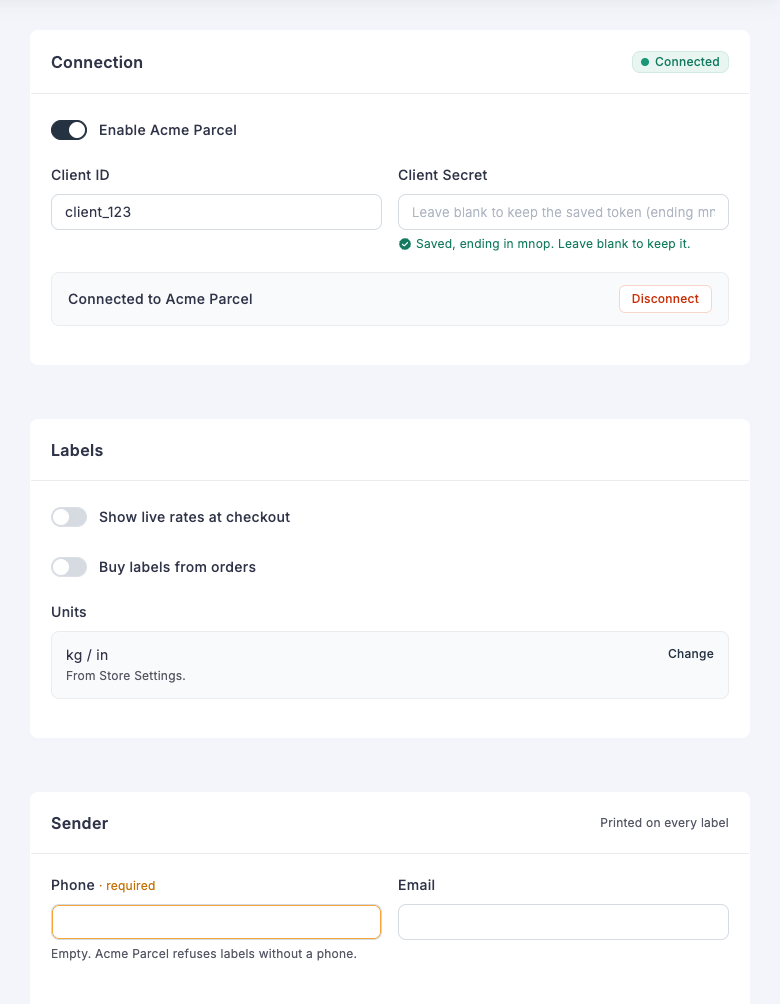
This page comes from these fields:
| On the page | Field |
|---|---|
| Connection, Labels and Sender cards | section |
| "Connected" tag | badge on the section |
| "Printed on every label" | aside on the section |
| Enable, rates and labels switches | toggle |
| Client ID and Phone, Client Secret and Email in two columns | 'width' => 'half' |
| Saved secret note | password |
| Connected strip with its Disconnect button | status with an action |
| Units row with its Change link | readonly with a link |
| "required" beside Phone | label_note |
| Warning under the empty Phone field | empty_hint |
Carrier details
meta() describes the carrier.
| Key | Required | Purpose |
|---|---|---|
slug | Yes | Must match the key you registered it under. |
name | Yes | Shown in the carrier list, the shipment form and on shipments. |
description | No | Shown in the carrier list. |
supports | No | Any of rates, labels, tracking. |
webhook_hint | No | Instructions shown under the webhook URL. |
A carrier without slug and name is left out of the settings pages.
Saving
A save runs in this order:
- Keeps only the keys you declared. An undeclared key in the request is dropped.
- Drops an empty secret, which means the admin did not retype it, so the stored value stays.
- Sanitizes the values and converts toggles to
yesorno. - Calls
validateSettings(). Return the array, changed if you need to, or aWP_Errorto reject the save with your message. - Merges the result into the stored settings.
Storing your own data
Your carrier can store values the merchant never edits, such as tokens, a webhook secret or the time of the last event. Add them in validateSettings(), or call $this->settings->save() at any time:
php
$this->settings->save(['last_event_at' => gmdate('Y-m-d H:i:s')]);save() merges into the stored settings, so other keys stay as they are. Keys you did not declare in fields() are never sent to the browser. Add them to getDefaults() as well.
Read a value with $this->settings->get('key'). Give every key a value in getDefaults().
isEnabled() decides whether checkout offers your carrier. The default checks that is_active is yes. Override it to require credentials as well. ProvidesLiveRates also requires an enable_rates setting of yes.
Input fields
Every field has a key, type and label. Keys share one store, so each must be unique. hint adds help text.
| Type | Stores | Notes |
|---|---|---|
text | String | placeholder is optional. |
password | String | Returned to the browser as an empty string. The form shows that a value is saved and its last four characters. |
toggle | yes or no | |
select | Option value | 'options' => [['value' => 'a', 'label' => 'A'], ...]. Add groups for a searchable list with headings: 'groups' => [['label' => 'Your accounts', 'options' => [...]]]. |
mode | Option value | Radio cards. Each option can hold its own fields. |
Input fields also accept:
label_note: a small note beside the label.'width' => 'half': two fields share a row.empty_hint: a message shown while the field is empty, such as['tone' => 'warn', 'text' => 'Labels need a phone.'].
Add 'is_secret' => true to mask any other field type in the same way as a password.
A mode field shows an option's fields only while it is selected. Nesting is limited to one level.
php
[
    'key'     => 'sandbox_mode',
    'type'    => 'mode',
    'label'   => __('Connection Mode', 'acme-parcel-for-fluent-cart'),
    'options' => [
        [
            'value'  => 'no',
            'label'  => __('Live', 'acme-parcel-for-fluent-cart'),
            'hint'   => __('Labels are real and billed.', 'acme-parcel-for-fluent-cart'),
            'fields' => [
                ['key' => 'live_key', 'type' => 'password', 'label' => __('Live Key', 'acme-parcel-for-fluent-cart')],
            ],
        ],
        [
            'value'  => 'yes',
            'label'  => __('Test', 'acme-parcel-for-fluent-cart'),
            'fields' => [
                ['key' => 'test_key', 'type' => 'password', 'label' => __('Test Key', 'acme-parcel-for-fluent-cart')],
            ],
        ],
    ],
],
Display fields
These show information and store nothing. Each one still needs a unique key.
| Type | Keys | Purpose |
|---|---|---|
section | label, hint, aside, badge, active_if | Starts a new card. aside is short text in the card header. badge is a tag such as ['text' => 'Connected', 'tone' => 'ok', 'dot' => true], with a tone of ok, warn, err or mute. active_if dims the card until a field has a value: ['key' => 'is_active', 'value' => 'yes']. |
webhook_url | Places the webhook URL here. Without it, the URL appears at the end of the form. | |
status | title, text, tone, items, actions, note | A strip with facts and buttons. tone of err shows it as an error. |
readonly | label, value, hint, link | A value managed elsewhere. |
notice | text, tone, link | An inline message. tone is mute, warn or err. |
webhook_setup | label, steps, open, mask_param | Manual setup steps with a masked URL. mask_param names the query argument to hide. **word** in a step is shown in bold. |
A link is ['label' => 'Change', 'route' => '/settings/store-settings'], using a route in the FluentCart admin.
Any field can use show_if to appear only while another field has a value. A hidden field keeps its stored value.
php
['key' => 'label_format', 'type' => 'text', 'label' => 'Label format', 'show_if' => ['key' => 'enable_labels', 'value' => 'yes']],Status actions
A button in a status field runs at once, without Save. Use it for actions such as testing a connection.
php
[
    'key'     => 'connection',
    'type'    => 'status',
    'title'   => __('Connection', 'acme-parcel-for-fluent-cart'),
    'text'    => __('Check that your API key works.', 'acme-parcel-for-fluent-cart'),
    'actions' => [
        ['action' => 'test_connection', 'label' => __('Test connection', 'acme-parcel-for-fluent-cart'), 'variant' => 'primary'],
    ],
],
An action can also set variant to danger, and confirm to ['title' => '', 'text' => '', 'button' => ''] to ask first.
The button calls runAction():
php
public function runAction(string $action, array $data)
{
    if ($action !== 'test_connection') {
        return parent::runAction($action, $data);
    }

    $response = $this->request('GET', '/account');

    return is_wp_error($response)
        ? ['ok' => false, 'message' => $response->get_error_message()]
        : ['ok' => true, 'message' => __('Connected.', 'acme-parcel-for-fluent-cart')];
}
Return message and ok, or a WP_Error. The page then reloads the carrier, so fields() can reflect what the action stored. The route needs the store/sensitive permission.
Connecting with OAuth
A carrier that uses an API key needs only a password field. A carrier that uses OAuth needs the merchant to log in on the carrier's site and return.
Buttons on the settings page run in the background, and a link opens FluentCart admin routes. So start the login from a full-page link and handle both ends with a FluentCart route, the same way the Stripe and PayPal connections work. ?fluent-cart={name} on your site fires fluent_cart_action_{name}.
1. Add the route and the link
php
add_action('fluent_cart_action_acme_connect', function ($data) {
    \FluentCart\App\Modules\Shipping\Carriers\Core\CarrierManager::carrier('acme')->handleConnect($data);
});

add_filter('plugin_action_links_' . plugin_basename(__FILE__), function ($links) {
    if (current_user_can('manage_options') && class_exists('\\AcmeParcel\\AcmeCarrier')) {
        $links[] = '<a href="' . esc_url(\AcmeParcel\AcmeCarrier::connectUrl()) . '">' . esc_html__('Connect', 'acme-parcel-for-fluent-cart') . '</a>';
    }

    return $links;
});
This puts Connect on the WordPress Plugins screen. Tell the merchant where to find it with a status field on your settings page.
2. Send the merchant out and handle the return
php
const AUTHORIZE_URL = 'https://auth.acme-parcel.example/oauth/login';
const TOKEN_URL     = 'https://auth.acme-parcel.example/oauth/token';

public static function connectUrl(): string
{
    return add_query_arg([
        'fluent-cart' => 'acme_connect',
        'intent'      => 'connect',
        '_wpnonce'    => wp_create_nonce('acme_connect'),
    ], home_url('/'));
}

public function handleConnect(array $data): void
{
    if (!current_user_can('manage_options')) {
        wp_die(esc_html__('You do not have permission to do this.', 'acme-parcel-for-fluent-cart'), '', ['response' => 403]);
    }

    $intent     = sanitize_key((string) Arr::get($data, 'intent', ''));
    $stateKey   = 'acme_oauth_state_' . get_current_user_id();
    $redirectTo = add_query_arg(['fluent-cart' => 'acme_connect', 'intent' => 'callback'], home_url('/'));

    if ($intent === 'connect') {
        check_admin_referer('acme_connect');

        $state = wp_generate_password(32, false);
        set_transient($stateKey, $state, 10 * MINUTE_IN_SECONDS);

        wp_redirect(add_query_arg([
            'response_type' => 'code',
            'client_id'     => rawurlencode((string) $this->settings->get('client_id')),
            'redirect_uri'  => rawurlencode($redirectTo),
            'state'         => $state,
        ], self::AUTHORIZE_URL));
        exit;
    }

    $state    = (string) Arr::get($data, 'state', '');
    $expected = (string) get_transient($stateKey);
    delete_transient($stateKey);

    if ($intent !== 'callback' || $expected === '' || !hash_equals($expected, $state)) {
        wp_die(esc_html__('This connection request has expired. Please try again.', 'acme-parcel-for-fluent-cart'), '', ['response' => 400]);
    }

    $tokens = $this->requestTokens([
        'grant_type'   => 'authorization_code',
        'code'         => sanitize_text_field((string) Arr::get($data, 'code', '')),
        'redirect_uri' => $redirectTo,
    ]);

    if (is_wp_error($tokens)) {
        wp_die(esc_html($tokens->get_error_message()), '', ['response' => 502]);
    }

    $this->storeTokens($tokens);

    wp_safe_redirect(admin_url('admin.php?page=fluent-cart#/settings/shipping/carriers/' . self::SLUG));
    exit;
}
Register https://your-site.com/?fluent-cart=acme_connect&intent=callback as the redirect URL in your OAuth app. This route is public, so keep all three checks: the manage_options permission, the nonce when the login starts, and the single-use state when it returns.
3. Store and refresh the tokens
php
/**
 * @return string|\WP_Error
 */
protected function accessToken()
{
    if ((int) $this->settings->get('token_expires_at') > time() + MINUTE_IN_SECONDS) {
        return Helper::decryptKey((string) $this->settings->get('access_token'));
    }

    $tokens = $this->requestTokens([
        'grant_type'    => 'refresh_token',
        'refresh_token' => Helper::decryptKey((string) $this->settings->get('refresh_token')),
    ]);

    if (is_wp_error($tokens)) {
        return $tokens;
    }

    $this->storeTokens($tokens);

    return (string) $tokens['access_token'];
}

protected function storeTokens(array $tokens): void
{
    $refreshToken = (string) Arr::get($tokens, 'refresh_token', '');

    $this->settings->save([
        'access_token'     => Helper::encryptKey((string) $tokens['access_token']),
        'refresh_token'    => $refreshToken !== '' ? Helper::encryptKey($refreshToken) : $this->settings->get('refresh_token'),
        'token_expires_at' => time() + (int) Arr::get($tokens, 'expires_in', 0),
    ]);
}

/**
 * @return array|\WP_Error
 */
protected function requestTokens(array $body)
{
    $response = wp_remote_post(self::TOKEN_URL, [
        'timeout' => 15,
        'headers' => ['Authorization' => 'Basic ' . base64_encode($this->settings->get('client_id') . ':' . $this->settings->get('client_secret'))],
        'body'    => $body,
    ]);

    if (is_wp_error($response)) {
        return new \WP_Error('acme_unreachable', $response->get_error_message(), ['http_code' => 0]);
    }

    $code = (int) wp_remote_retrieve_response_code($response);
    $data = json_decode(wp_remote_retrieve_body($response), true);

    if ($code !== 200 || empty($data['access_token'])) {
        return new \WP_Error('acme_token_failed', __('Acme Parcel refused the connection.', 'acme-parcel-for-fluent-cart'), ['http_code' => 401]);
    }

    return $data;
}
Call accessToken() in your API request and send the result as the bearer token. Return its WP_Error if it fails. Helper::encryptKey() keeps the tokens encrypted in the database. A failed refresh shows no rates at checkout and backs off for 60 seconds, and the stored tokens stay. Show this to the merchant with a setup notice.
If your provider issues a new refresh token each time, two checkouts can refresh at once and one can lose. Guard the refresh with a short lock in that case.
4. Disconnect
A status button works here, because nothing leaves the page:
php
public function runAction(string $action, array $data)
{
    if ($action !== 'disconnect') {
        return parent::runAction($action, $data);
    }

    $this->settings->save(['access_token' => '', 'refresh_token' => '', 'token_expires_at' => 0]);

    return ['ok' => true, 'message' => __('Disconnected.', 'acme-parcel-for-fluent-cart')];
}
Make isEnabled() require the refresh token, so checkout offers the carrier only while it is connected:
php
public function isEnabled(): bool
{
    return $this->settings->get('is_active') === 'yes' && (string) $this->settings->get('refresh_token') !== '';
}
Setup notices
getSetupNotices() lists problems the merchant must fix. They appear on the carrier pages, and the carrier list marks the carrier as needing attention.
php
public function getSetupNotices(): array
{
    $notices = [];

    if ($this->settings->get('is_active') === 'yes' && !$this->settings->get('api_key')) {
        $notices[] = [
            'type'    => 'error',
            'message' => __('Add your API key to start showing rates.', 'acme-parcel-for-fluent-cart'),
            'action'  => null,
        ];
    }

    return $notices;
}
type is error, warning or info. action is null or ['label' => '', 'route' => '']. This method runs each time the carrier list loads, so read stored settings only and do not call your API.
The ProvidesSetupNotices trait adds two helpers. originSetupNotice($carrierName) returns a notice when the store address is incomplete, or null. setupNotice($type, $message) builds a plain notice. It needs buildOrigin(), which ProvidesLiveRates provides.